


CDisplayEx Comic Reader Lite
Progdigy Software
Reading comics on a phone or tablet sounds simple until the reader gets in the way. Pages may appear too small, panels can become awkward to follow, and a large collection of files quickly turns into a mess. I spent time with CDisplayEx Comic Reader Lite to see whether it makes everyday comic reading easier, especially on a device shared by people in the same household. My overall impression is that it is a practical, focused reader for people who already have digital comics and want a straightforward way to open them.
This is a free comics app from Progdigy Software, aimed at Everyone and available on Android and iOS. It has been around since Apr 15, 2018, and its audience is substantial: the listing shows over a million installs, with a 4.2 average from around fourteen thousand ratings. Those figures suggest a mature, familiar tool rather than a new experiment, but they do not remove the need to understand what kind of reader it is. It is built around viewing comics, not replacing a comic shop, subscription service, or personal library manager.
How it works in a shared household
The most convincing use case is a home where several people use the same tablet at different times. One person may read a downloaded graphic novel in the evening, another may open a short comic later, and a child may use the device for age-appropriate material. In that situation, a dedicated reader is more comfortable than opening comic archives through a general file manager or trying to read them in a browser.
The Lite edition makes sense when your collection already exists as files. Instead of searching through unrelated folders with a generic archive tool, you can use an app designed around comic pages and sequential reading. That difference is easy to underestimate. A comic is not just a stack of images: the order, page shape, panel layout, and direction of reading all affect whether the experience feels natural.
I particularly like this approach for a tablet left in a living room or passed between family members. A larger screen gives full-page artwork room to breathe, while the reader remains more convenient than a desktop program when someone wants to sit on the sofa. On a phone, it is still useful, but the screen size makes the choice of layout more important. Dense pages may require zooming and panning, which is workable for occasional reading but less relaxing during a long session.
Related News

Instagram Is No Longer a Photo App. It Is an Attention Engine

Microsoft Teams Mobile: When Collaboration Becomes Navigation

How the NFL App Adapts to Android and iOS Updates

Temu: Elevate Your Shopping Experience to Billionaire Status

Why Traffic Rider Works Best as a Precision Reflex Game

How Google’s Find Hub Transforms Everyday Searches
A realistic example would be a parent keeping a selection of comics on a shared tablet for a weekend trip. The parent can read a longer book, another household member can open a different file, and the tablet does not need a separate reading service for every person. The important point is that the app handles the reading task; it does not create a shared family library or decide which material belongs to whom.
What to prepare before handing over the device
Because this is a reader rather than a complete content platform, the household experience depends heavily on how the files are organized. I would create clear folders before importing or opening anything: one for personal reading, one for children, and one for material that should not be casually opened by everyone. That small bit of preparation prevents the app from becoming a confusing shelf of anonymous files.
This is also where expectations matter. The Everyone age label describes the app itself, not every comic a person may open with it. A reader can be suitable for all ages while displaying files intended for mature readers. Parents should therefore choose the collection themselves and avoid treating the age label as a content filter.
Gallery
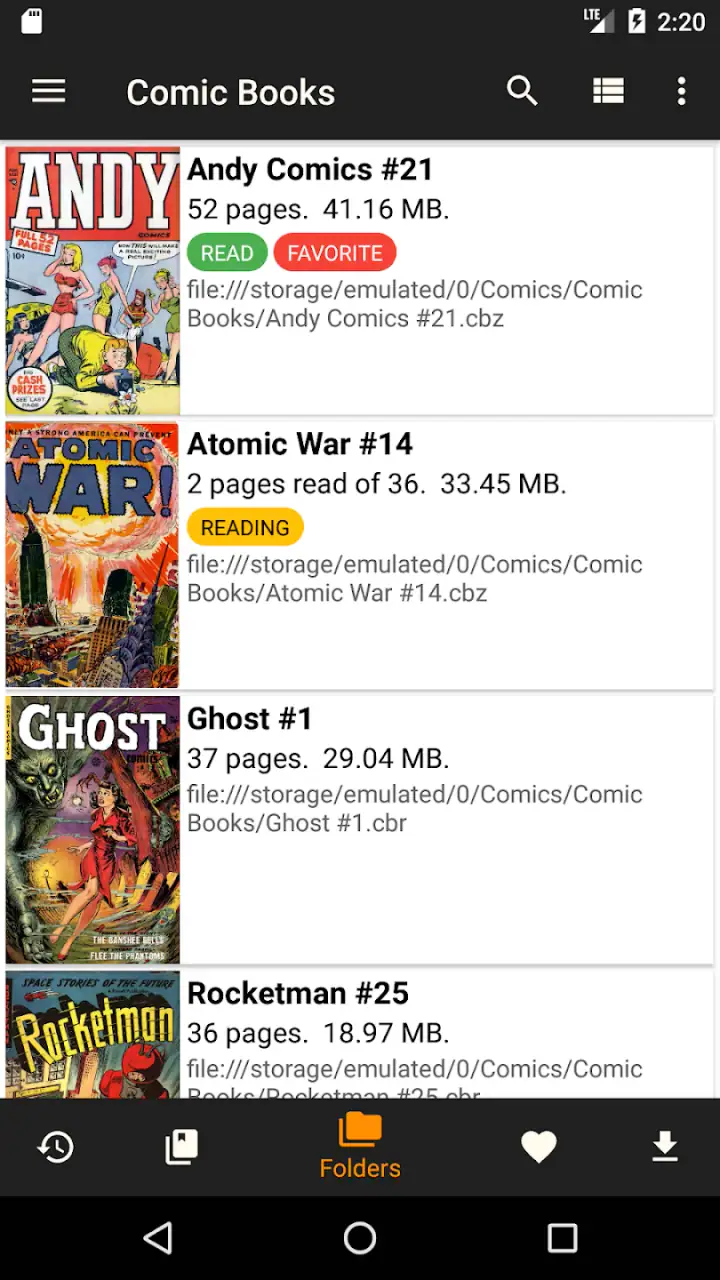
I would not rely on the app as a substitute for separate device accounts or household rules. If several people use one unlocked tablet, the boundaries come from the device and the file arrangement, not from assumptions about the reader. That is not a criticism of its core purpose, but it is an important distinction for families.
Setting up a clean reading routine
My preferred setup is deliberately simple. I keep the comic files in recognizable folders, use consistent filenames, and remove duplicates before opening them. When a collection contains several volumes, numbering the files clearly is more useful than expecting everyone to remember which cover comes next. This is one of the less glamorous but more valuable improvements: a well-organized folder makes the reading app feel much smarter.
For a shared device, I would also agree on a basic handoff routine. The current reader should close the book after finishing, return to the library or file view, and leave the tablet in a neutral place. That avoids the next person opening a page that was intended to remain private or spoiling a story for someone else.
There is a trade-off here. A dedicated comic service may offer a polished catalog, cloud synchronization, and a more guided discovery process. CDisplayEx Comic Reader Lite is more attractive when you value control over your own files. You choose what is stored locally and how it is arranged, but you also take responsibility for finding, naming, and maintaining that collection.
Reading comfort and practical controls
The app’s central strength is its focus. When I open a comic reader, I want the artwork to take priority over recommendations, social features, or a storefront. A focused interface makes it easier to settle into a book and less likely that a shared device turns reading time into browsing time.
That focus also exposes the main limitation: the experience varies with the source file and screen. A clean, well-prepared comic is enjoyable; a badly scanned page, oversized archive, or awkwardly formatted file can still be frustrating. No reader can completely repair poor source material. On a phone, I would test a few pages before committing to a long volume, especially if the artwork uses tiny lettering or wide double-page spreads.
For comfortable reading, I recommend holding the device in the orientation that gives the page the best balance between text size and visible artwork. Portrait mode can feel natural for a single page, while landscape may help with wide layouts. The right choice depends on the comic, so I would not lock myself into one setting for every book.
Another useful habit is to check how a page behaves before sharing the device. If a younger reader needs to zoom repeatedly, the comic may be better suited to a larger tablet or a different edition. This is not about technical skill; it is about reducing friction. A child who has to fight the interface is likely to lose interest, while an adult may tolerate the same inconvenience for a favorite series.
Boundaries between personal collections
On a shared device, the biggest question is not whether the app can display a comic. It is whether everyone can tell whose material they are opening. I would treat folders as the first boundary and the device’s own user or lock features as the second, where available. The app should not be expected to provide family-account separation unless that is explicitly part of your setup.
This matters for privacy as well as organization. A personal reading list can reveal interests, unfinished stories, or material someone simply does not want discussed. Keeping collections separated by folder is helpful, but it is not the same as secure account isolation. If genuine privacy matters, a shared tablet may be the wrong place for private files.
The same principle applies to progress. If people alternate on one device, they should communicate about which volume or chapter is next rather than assuming the reader will understand each person’s place. I found that a simple note in the filename or a shared household message can prevent confusion, especially when several books have similar covers.
Coordination without making reading feel like administration
One reason I like a focused reader is that it does not force a household to create a complicated system. A small collection can be managed with folders and clear names. For a larger one, I would make a lightweight index outside the app, such as a note listing the series and reading order. This is more reliable than asking each person to remember what was opened last.
That workflow is especially useful when a parent and child read the same series at different speeds. The parent can keep later volumes separate, while the child receives access to only the files chosen for them. It is a manual arrangement, but it gives the adult more control than placing an entire mixed collection in one visible folder.
There is also a social advantage to using local files: household members can lend a device without needing to explain a subscription account or hand over a personal login. The downside is that local storage does not automatically follow a reader from one device to another. If someone regularly switches between a phone and tablet, they should expect to manage the files themselves rather than assume every book and position will appear everywhere.
Compared with a browser-based comic platform, this app feels less dependent on a catalog and more dependent on preparation. Compared with a generic image viewer, it is better aligned with the rhythm of comic pages. Compared with a full library-management application, it is narrower and likely easier to approach, but it may not satisfy readers who want extensive cataloging, recommendations, or a large discovery ecosystem.
Age, trust, and choosing suitable material
The Everyone rating is reassuring for installing the reader in a family environment, but responsible use still depends on the files. Digital comics can cover a wide range of subjects, and the app itself does not turn that range into a child-safe shelf. I would select the material in advance, explain which folder belongs to which reader, and use the device’s broader access controls when a child should not browse everything on it.
This is a good example of the difference between an app’s age classification and a household’s trust model. The software may be appropriate for a young user, while a particular comic is not. Parents who want automatic content screening, child profiles, or a curated catalog should look toward a service designed around those needs instead.
For older children and teenagers who already understand file organization, the app can be a useful bridge into managing a personal digital collection. They can learn to keep volumes in order, recognize storage limits, and take care of a shared device. I would still prefer a separate account or device profile for sensitive collections, because a folder name is a practical boundary, not a strong privacy barrier.
Where the Lite edition fits best
For me, the Lite edition is most appealing when the goal is uncomplicated reading. It is free, so trying it does not require committing money before seeing whether the layout suits your files. That makes it a sensible first choice for someone moving from paper comics to digital reading, or for a household that wants a basic reader on an existing device.
I would be more cautious if you expect the app to supply comics, synchronize a large collection automatically, or act as a complete family media center. Those expectations point toward a different kind of product. A subscription service may be better for discovery and convenience; a specialist library tool may be better for cataloging; a secure personal setup may be better for private collections.
The free model is also worth viewing realistically. Free is convenient, but the most important cost may be your time: sorting files, checking formats, and maintaining a sensible folder structure. If you already own a tidy collection, that cost is small. If your comics are scattered across downloads and cloud folders, the setup work may be more noticeable than the app itself.
My household verdict
After using it as a focused comic reader, I see CDisplayEx Comic Reader Lite as a strong fit for readers who want to open their own files without being pushed into a broader content ecosystem. Its best qualities appear when the device is a tablet, the collection is organized, and everyone understands that the app displays material rather than managing family permissions.
I would recommend it to a friend who says, “I have digital comics already; I just need a comfortable reader.” I would also recommend it for a shared household willing to separate folders, choose age-appropriate material, and communicate about reading order. Those small habits make a noticeable difference and prevent the app from being blamed for problems caused by an untidy collection or unclear boundaries.
I would skip it if your priority is a curated children’s experience, automatic account separation, or a service that handles discovery and synchronization for you. It is also not the ideal answer for someone who dislikes managing files. In those cases, a catalog-first comic service may feel smoother even if it offers less control.
My final view is positive but practical: this is a reader, not a household management system. Used within that boundary, it does its job well and keeps the attention on the page. The free price, broad availability, and long presence since Apr 15, 2018 make it easy to try, while the 4.2 average from around fourteen thousand ratings gives it a reassuring track record. The best results come from pairing the app with thoughtful file organization and clear sharing rules.
FAQs for CDisplayEx Comic Reader Lite
What file formats does CDisplayEx Comic Reader Lite support?
CDisplayEx Comic Reader Lite supports a wide range of comic book file formats, including CBR, CBZ, PDF, and more. This versatility ensures that you can view almost any comic file without needing to convert it, making it a convenient choice for comic enthusiasts who have diverse collections.
Is CDisplayEx Comic Reader Lite available for both Android and iOS?
Yes, CDisplayEx Comic Reader Lite is available for both Android and iOS platforms. This cross-platform availability allows users to enjoy their favorite comics on a variety of devices, ensuring flexibility and convenience when accessing your comic library from different environments.
Does CDisplayEx Comic Reader Lite offer any customization options for reading?
CDisplayEx Comic Reader Lite offers several customization options to enhance your reading experience. Users can adjust the page layout, zoom levels, and background colors. Additionally, the app supports both single and double-page views, allowing you to tailor your reading experience to your preferences.
Are there any in-app purchases or ads in CDisplayEx Comic Reader Lite?
CDisplayEx Comic Reader Lite is a free app, but it may contain ads. While the Lite version offers essential features for reading comics, there might be optional in-app purchases available to unlock additional features or remove ads, providing an ad-free experience for users who prefer it.
How does CDisplayEx Comic Reader Lite handle large comic libraries?
CDisplayEx Comic Reader Lite is designed to efficiently manage large comic libraries. It features a user-friendly interface with a library management system that allows for easy organization and quick access to your comics. The app also supports sorting by title, author, and series, making it simple to find and enjoy your favorite comics.
Pros
- Simple and intuitive interface.
- Supports various comic file formats.
- Customizable reading settings.
- Fast and smooth performance.
- Low resource consumption.
Cons
- Ads can be intrusive at times.
- Limited features in the free version.
- No cloud sync for comics.
- Occasional minor bugs.
- Requires manual file management.


